Coloring Games & Coloring Kids
- 3.9
- Rating
- 5.00M
- Installs
- Free
- Price

 Analysis by App-foxy
I spent time with Coloring Games & Coloring Kids as a simple drawing and painting game for young children, and my first impression was clear: this is designed to make creative activity easy to start, not to teach art through a structured course. It belongs to the educational game category, but its educational value comes mainly from practice with colors, hand control, visual attention, and completing small creative tasks.
That distinction matters when deciding whether it belongs on a child’s device. If you want a calm activity that a toddler or preschooler can explore with limited help, this game makes sense. If you expect reading lessons, detailed drawing instruction, or a full early-learning curriculum, I would look elsewhere. I see it as a digital coloring book with game-like presentation rather than a traditional lesson app.
My short recommendation is to treat it as a supervised creative tool: useful for short sessions, easy to understand, and free to start, but not something I would rely on as a child’s only educational app.
You May Also Like

 Blood Strike: 2.5 Anniversary
Blood Strike’s Loadouts Turn Every Drop Into a Tactical Gamble
A close look at Blood Strike’s custom loadouts: how fast access to signature weapons reshapes its battle royale rhythm, rewards preparation, and narrows the gap between fights.

 Pandora - Music & Podcasts
Pandora’s Music Is Easy to Start, but Harder to Recover
Pandora’s strength is its low-effort path from a seed to a station. Its weak spot is how much confidence it asks you to place in connection, setup, and quiet recovery.

 8 Ball Pool
 Is Built on Rivalries, Rematches, and Routine
A close look at the rivalries, rematches, shared routines, and unanswered safety questions that turn a quick pool match into a persistent mobile community.

 Samsung Music
’s Quiet Strength Is Playing What You Already Own
Its reach comes less from spectacle than from dependable access to a personal library. That simplicity is both the app’s strongest retention engine and its ceiling.

 AccuWeather: Weather Radar
AccuWeather Review: A Quick, Clear Forecast for Everyday Decisions
For everyday plans, the best forecast is the one you can understand quickly. AccuWeather makes rain timing, radar, and local conditions easy to act on, with a few trade-offs.

 Hill Climb Racing
Why Hill Climb Racing Still Turns Crashes Into One More Run
A tiny car, a bumpy hill and one more upgrade: Hill Climb Racing keeps resurfacing because its simple chaos makes every near-miss feel personal.
More From Our News Desk



How I would decide whether it fits your child
I would use the first few sessions to see whether your child can settle into choosing colors and completing pictures without needing constant help. Their response matters more than how long they stay engaged at first: look for whether they return to the activity willingly after the initial novelty wears off. I’d also decide in advance how you’ll handle paid items, so a child’s curiosity doesn’t make that choice for you.
Age, patience, and the kind of learning you want
The Everyone age rating makes the intended audience broad, but the actual experience is most naturally suited to toddlers and preschool-age children who enjoy tapping, choosing colors, and filling pictures. A child who already wants complex drawing controls may find it too basic, while a younger child may appreciate that the activity does not demand much reading.
I would judge the game by three practical questions. Can your child use a touchscreen without becoming frustrated? Do they enjoy open-ended coloring more than quizzes? And are you comfortable with a creative activity that may need an adult nearby? For a child who answers yes to the first two, it is a reasonable candidate.
The developer is GunjanApps Studios, and the game has been available since May 26, 2018. Its current version is 9.5, with Android support starting at version 7.0. That makes device compatibility worth checking before installation, especially if the app is intended for an older tablet used by a child.
What the session feels like in everyday use
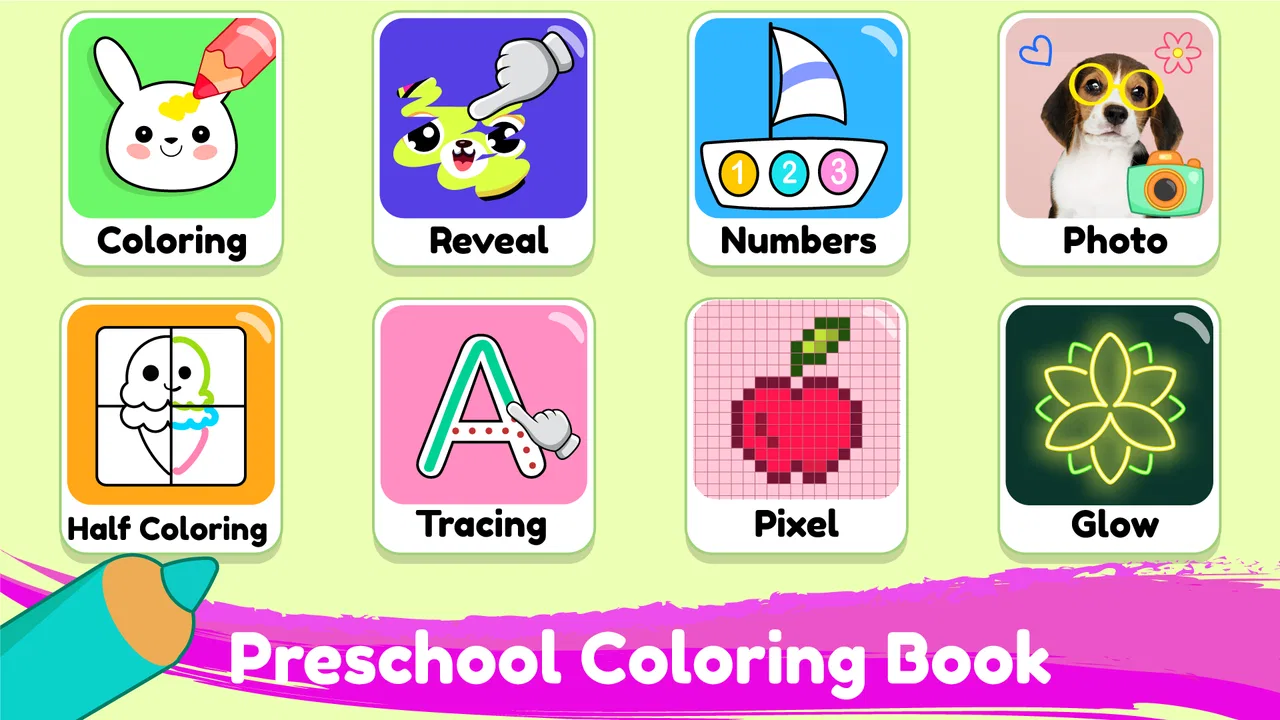
I found the basic appeal easy to understand: open the game, choose a coloring activity, select a color, and begin filling the picture. That short path is valuable with young children because every extra menu or instruction can turn a creative moment into a support request. The app’s store short description is “Coloring Games,” and that plain wording reflects the central experience accurately.
A realistic use case would be a child waiting while dinner is prepared. Instead of handing over a complicated drawing program, a parent can offer this for a short, clearly bounded activity. The child can experiment with colors and see the picture develop without needing to understand a long tutorial. I would still set the device where an adult can glance over, because young children often tap through screens quickly and may need help returning to the activity.
Another useful moment is travel. Coloring on paper requires crayons, a hard surface, and enough room to keep pages from sliding around. A phone or tablet removes some of that preparation. The trade-off is that the digital activity does not provide the same tactile experience as holding a crayon, so I would use it alongside physical drawing rather than as a replacement.
The decision criteria I found most important
For this particular game, ease of entry matters more than depth. A child should be able to understand the main action from the screen itself. The second criterion is tolerance for repetition: coloring games often work because children can repeat a familiar pattern with different pictures and colors. If your child needs constant novelty, the experience may lose its appeal sooner.
The third criterion is your approach to purchases. Coloring Games & Coloring Kids is free to download, but in-app items are listed at $4.99 to $5.99 each. I would check the purchase settings before handing the device over. The free starting point is helpful, but the presence of paid items means parents should not assume every part of the experience is available without a purchase.
Finally, consider whether you want a quiet creative activity or measurable academic progress. This game can support early familiarity with colors and controlled touch, but it is not the same as an app built around phonics, counting practice, letter tracing, or teacher-led lessons. Choosing it for the wrong educational goal would lead to disappointment even if the coloring itself works well.
Where Coloring Games & Coloring Kids wins, and where another category may fit better
I find the clearest way to choose is to start with the activity your child actually wants: filling in pictures, drawing freely, or practicing a specific school skill. Coloring Games & Coloring Kids fits best when ready-made coloring is the draw; paper, open-ended drawing tools, or focused learning apps may suit other goals better. The next section weighs those trade-offs so you can pick the option that fits your routine.
Its strongest advantage is the low-pressure creative loop
What I like most is the lack of pressure. A child can approach a coloring page as play rather than as a test with a correct answer. That is important for children who become discouraged when an educational app marks mistakes or moves too quickly. Here, the value is in trying colors, filling spaces, and making a visible result.
The format also gives parents an easy way to encourage conversation. Instead of asking a child to complete a worksheet, I might ask which color they want next, why they chose it, or what they think the picture represents. The app becomes a prompt for language and observation, even though those conversations happen outside the game itself.
A less obvious strength is that digital coloring can make experimentation feel reversible. On paper, a heavy mark or an unwanted color may spoil a page. On a screen, a child is generally more willing to try something unusual because the result feels less permanent. That can be useful for hesitant children who avoid drawing because they think their work must look perfect.
Tips that make the experience more useful
I would avoid presenting it as an unlimited reward. A short routine works better: choose one or two pictures, talk about the colors, then put the device away. This keeps the game connected to a specific creative goal instead of turning it into background screen time.
I would also use a larger tablet when possible rather than a small phone. Coloring requires room for a child’s finger, and a larger display can make the activity less cramped. This is not a special feature of the game, but it changes how comfortably a young child can interact with any digital coloring tool.
One practical approach is to let the child choose the picture but have the adult name a small challenge, such as using warm colors or finding every area that has not been filled. That adds observation and vocabulary without changing the app into a formal lesson. It also prevents the session from becoming nothing more than random tapping.
For children learning to share, two people can take turns choosing colors. The game then becomes a simple cooperative activity rather than a solitary screen habit. I would not expect precise turn-taking tools inside the app; the useful structure comes from the parent or sibling guiding the interaction.
How it compares with paper coloring and structured learning apps
Compared with paper coloring books, this game is more convenient when you are traveling or want to avoid carrying supplies. It is also easier to reset after an experiment. Paper wins for sensory development, grip practice, and creating something that can be displayed on a refrigerator. I would choose paper when the goal is strengthening pencil control or giving a child a break from screens.
Compared with a drawing app aimed at older children, this game is likely the better starting point for a toddler because the activity is less intimidating. A more advanced drawing tool may offer greater control, but that can create unnecessary friction for a child who only wants to color a picture. The right choice depends on whether the child needs freedom to draw from nothing or a ready-made image to complete.
Compared with structured preschool learning apps, this one is more relaxed and creative. A phonics or counting app is the better choice when you want a clearly defined academic target and progress through lessons. Coloring Games & Coloring Kids is the better choice when you want to encourage visual exploration without turning every minute into instruction.
Where I would choose an alternative
I would skip this game for a child who becomes restless with repetitive coloring or wants to build detailed scenes from scratch. That child may get more from a general drawing application, physical art materials, or a craft activity that offers more freedom.
I would also choose another educational category if the main objective is school readiness. For letter recognition, counting, pronunciation, or guided problem-solving, a dedicated learning app should provide a clearer path. Coloring can support attention and coordination, but it should not be mistaken for direct practice in those subjects.
Parents who want a completely offline, no-device routine should stay with paper and washable art supplies. The convenience of a digital coloring game is also its limitation: the child is still interacting with a screen, and the activity depends on the device being available and suitable for small hands.
Understanding the free model before you commit
The free price makes trying the game straightforward, which is useful because a child’s response to a coloring app is highly personal. Some children immediately understand the appeal; others lose interest after a few minutes. I would install it, observe how the child handles the first sessions, and only then decide whether any paid item is worthwhile.
The $4.99 to $5.99 price range for individual in-app items is significant enough that I would make the purchase decision deliberately rather than tapping through quickly. A paid item may be reasonable if it gives the child a type of activity they repeatedly enjoy, but I would not buy simply because the child reaches a locked screen once.
This is also where the cost of switching matters. Moving from this game to paper is inexpensive in concept but changes the routine: you need supplies, cleanup, and a place to work. Moving to a structured learning app may offer clearer educational goals but can require more adult explanation. Staying with this game costs less effort when all you need is a quick coloring activity, provided the available content keeps the child interested.
What the public response suggests, without treating it as a guarantee
The game has passed five million installs, which tells me it has reached a substantial audience. Its average rating is 3.9 from around 7.4 thousand ratings, with 285 written reviews. I read that as a mixed but usable signal: many families find enough value to keep it installed, while the experience is not universally perfect.
I would not use the rating alone to decide. Coloring apps can receive different reactions depending on a child’s age, a parent’s expectations, the device screen, and how much content the family wants without paying. A parent seeking a simple activity may be satisfied where another expects a polished curriculum. The practical test is whether your child can start coloring comfortably and whether the available activities remain useful after the novelty fades.
Questions I would answer before installing
Is it suitable for a very young child? It can be, especially for a child who already understands basic touch gestures, but I would introduce it with supervision. The Everyone rating does not remove the need for an adult to manage device use, purchases, and session length.
Does it replace a real coloring book? No. It is more convenient and less messy, but paper gives children a different kind of hand practice and a physical result. I see the digital version as an additional option for travel, waiting rooms, or short indoor activities.
Will it teach preschool subjects by itself? I would not count on that. Its educational benefit is connected to coloring, visual choice, and touch control. If you need letters, numbers, reading preparation, or a planned sequence of lessons, choose an app designed specifically for that purpose.
Should you pay for extra items? Only after checking how consistently your child uses the free experience. Because each listed purchase falls between $4.99 and $5.99, I would involve the adult making the purchase and avoid treating an in-app prompt as a recommendation.
Can it work on an older Android device? The minimum operating system is Android 7.0, so compatibility is better than with apps that require a recent phone or tablet. Even when the operating system qualifies, I would test the screen responsiveness and available storage before giving the device to a child.
My final recommendation for different families
I recommend Coloring Games & Coloring Kids to parents who want a straightforward digital coloring activity for a toddler or preschooler, especially when portability and quick setup matter. It is free to begin, has a clear creative purpose, and can support conversations about colors and pictures when an adult joins in.
I recommend it less strongly to families searching for deep educational progression. The game’s category is educational, but its learning is informal. It will not replace a well-designed early-learning program, supervised art with real materials, or a child-led craft session.
After using it, my view is that its best role is small and specific: a low-pressure coloring break that fits into daily life. Keep sessions short, check purchase controls, and pair it with paper drawing or more focused learning activities. Under those conditions, the game earns a place as a handy creative option rather than an all-purpose preschool solution.
For that audience, I would give it a try. The combination of a free starting price, broad compatibility, and an easy coloring concept lowers the risk of testing it. Just make the decision based on your child’s actual response, not on the install count or rating alone. If your child enjoys choosing colors and finishing simple pictures, this is a practical companion activity; if they need structured lessons or advanced creativity, switching to a more specialized option will be the better move.
FAQs for Coloring Games & Coloring Kids
01What is Coloring Games & Coloring Kids?
Coloring Games & Coloring Kids is a child-friendly digital coloring app designed to let young users create pictures with simple taps and swipes. It usually includes themed drawings, colors, brushes, and interactive effects that make coloring more entertaining than using a traditional coloring book. The interface is designed to be easy for children to understand, even with limited reading skills.
02Is Coloring Games & Coloring Kids suitable for toddlers and young children?
The app is generally aimed at children, but the ideal age can depend on the specific version, available activities, and parental preferences. Younger children may need help navigating menus or choosing pictures, while preschool and early-school-age users can often start coloring independently. Parents should review the age rating, content, advertisements, and privacy information before allowing unsupervised use.
03Does Coloring Games & Coloring Kids require an internet connection?
Some coloring activities may work offline after the application has been installed, while other features, picture packs, advertisements, or updates may require an internet connection. Offline availability can also vary between Android and iOS versions. If you want your child to use the app while traveling or without mobile data, open the main coloring sections first and verify which content remains accessible offline.
04Is Coloring Games & Coloring Kids free to download and use?
The app may be available as a free download, but free versions can include advertisements, optional purchases, locked coloring pages, or premium tools. The exact payment model may differ depending on the platform and region. Before handing the device to a child, parents should check the store listing and configure purchase restrictions to prevent accidental spending on additional content.
05Is Coloring Games & Coloring Kids safe for children?
The coloring activities themselves are designed for children and do not normally involve complex or inappropriate gameplay. However, safety also depends on advertisements, external links, analytics, and any in-app purchase options included in the version you install. Parents should supervise initial use, enable device-level parental controls, and review the app’s privacy policy before permitting regular access.
Pros
- Simple controls make it easy for young children to color independently.
- Bright illustrations keep kids engaged during short play sessions.
- Includes a variety of themes suitable for different interests.
- Works well as a quiet
- screen-based creative activity.
- Helps children practice color recognition and hand-eye coordination.
Cons
- Some content may be locked behind in-app purchases.
- The experience can become repetitive after extended play.
- Ads may interrupt the coloring experience in the free version.
- Limited tools may feel basic for older children.
- Requires device storage for downloading additional coloring pages.

Coloring Games & Coloring Kids
Gallery